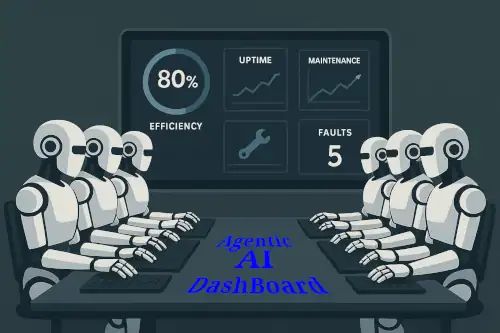
Consider how car dashboards have evolved over the past 100 years—from basic gauges to sophisticated digital interfaces. Have you noticed the dramatic shift in just the last one or two years? This same level of intelligent interaction and support is about to transform the maintenance arena.
Read the full forecast details in my latest article @ MaintenanceWorld: AI-Driven Interactive Tools for Maintenance
That’s a glimpse of what is in the the article: How to create and integrate an AI-powered interactive dashboard accessible on every device with secure login, here is a detailed technical explanation broken into clear parts:
1. What is Behind the Dashboard (Technical Architecture)?
An AI dashboard typically involves these core components:
- Data Layer: Centralized storage like data lakes or warehouses hold structured, semi-structured, and unstructured data. Data can come from multiple sources—databases, APIs, IoT sensors, CSV files, etc.
- Data Integration and ETL: Data pipelines extract, transform, and load data into the storage, ensuring cleanliness and consistency. Automated data quality checks and lineage tracking ensure reliable data.
- AI/ML Processing Layer: Machine learning models run on the integrated data to generate predictive and prescriptive analytics. This includes anomaly detection, forecasting, and recommendations.
- API Layer: Provides programmatic access to data, analytics results, and dashboard functionality—key for integration and interoperability. [6]
- User Interface Layer: The interactive dashboard UI displays visualizations and receives user input. AI capabilities here include natural language querying and autonomous insight generation (e.g., an analytics chatbot).
- Security and Governance: Authentication, authorization, data encryption, secure API access, and compliance mechanisms ensure the dashboard and data are protected.
Tools like Sisense, Microsoft Azure AI, or custom-built solutions adopt composable SDKs and APIs enabling flexible dashboard composition with AI components embedded deeply.
2. Preparing Your Data for Integration
- Identify Data Sources: List all data repositories—databases, APIs, spreadsheets, or IoT devices.
- Clean and Normalize Data: Use ETL or ELT tools to transform varied raw data into a consistent format.
- Schema Definition and Validation: Define data schemas (e.g., using JSON Schema or Pydantic in Python) to validate incoming data to prevent errors downstream.
- Data Update and Sync Mechanisms: Set intervals for real-time or batch updates, depending on use-case urgency.
- Data Access APIs: Make sure data endpoints support secure, reliable, and fast API access for dashboard queries.
3. Connecting or Plugging Your Data into the Dashboard
- Choose or develop dashboards supporting data connectors to your data sources (e.g., Google Sheets, SQL, REST APIs).
- Use SDKs or API clients to fetch data into the dashboard platform.
- Implement queries or scripts (possibly with Google Apps Script for Google Sheets) to pull or push data dynamically.
- Configure AI models either by embedding pre-trained services or training custom models on your data, ensuring outputs feed visual components.
- Use webhook or event-driven triggers for real-time dashboard refreshes.
4. Making the Dashboard Available on Every Device
- Responsive Web Design: Dashboard frontends should be built with responsive frameworks (React, Angular, Vue.js) that adapt UI elements for mobiles, tablets, and desktops.
- Mobile Apps: Native or hybrid mobile apps (Android/iOS) can embed dashboards or provide API access wrapped in a mobile UI.
- Cloud Hosting: Host dashboards in the cloud (AWS, Azure, Google Cloud) to ensure global availability and scalability.
- User Authentication and Single Sign-On (SSO): Integrate with identity providers (OAuth, SAML, OpenID Connect) allowing users to log in securely from any device.
- Session Management: Maintain secure user sessions with token-based authentication (JWT) and automatic session expiration.
- Progressive Web Apps (PWAs): Enable offline access and device-friendly UI without requiring app store downloads.
5. Security Measures
- Authentication and Authorization: Enforce strong user identity verification and role-based access control to limit data visibility according to permissions.
- Data Encryption: Secure data in transit (TLS/SSL) and at rest (AES encryption) to protect sensitive information.
- API Security: Use rate limiting, API keys, and scopes to secure data endpoints.
- Audit Trails and Monitoring: Maintain logs of user access and actions for compliance and anomaly detection.
- Compliance: Align with GDPR, HIPAA, or industry-specific data protection standards.
- Regular Penetration Testing and Updates: Continuously test for vulnerabilities and keep the software stack patched.
In essence, to build a technical AI-powered dashboard solution accessible everywhere, you need a well-architected system beginning with reliable data ingestion, AI analytics, secure APIs, a responsive or mobile-friendly UI, and strong security protocols.
This structure allows maintenance teams to interact with real-time insights securely from any device, leveraging AI to enhance decision-making and communication protocols like MCP [10].